Showing posts with label iphone. Show all posts

Friday, November 5, 2010

Muji Goes App Shit Crazy


Japanese retailer Muji has given non iPad users another reason to hate on that revolutionary little tablet. They've just released an app suite for the iPad and one lone app compatible with a few other Apple gadgets. Like the brick and mortar stores, the apps are not about frills -- they're purely functional. However, this doesn't mean you can't have any fun or indulge a bit. You're definitely one step closer to a paper-less environment with these super functional and stylish apps:
  • Muji Calendar (Free; iPad only) - Easy to use and syncs with your Google Calendar. Drag and drop to schedule events.
  • Muji Notebook ($3.99 USD; iPad only) - Draw freehand and enter typed data. On top of it all it recognizes your handwriting. It's a big step up from the Palm Zire (yup, I still have mine). If you're in a sharing is caring mood, feel free to email your notebook to friends.
  • Muji to Go ($3.99 USD; iPad only) - Several useful tools for the lady or dude on the go rolled in one; weather, world clock, calculator and Forex -- because you may need to turn that chedda' into brie. There's no bouncing from one app to another; toggle between them with the stroke of a finger. Muji apparel and other goods are suggested based on the app module you're using.
  • Muji Apparel Catalog (Free; iPhone, iPad & iPod Touch) Who cares if it's in Japanese? Now's a great time to learn with Rosetta Stone. Just kidding, at least you can look at the photos of Muji's new items.
Click the individual links above to learn more about, and to purchase each app.

Tuesday, August 17, 2010

How App'd: ChaseMobile with QuickDeposit


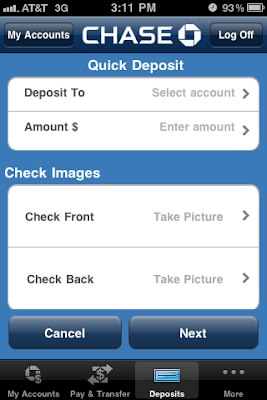
The strides developers are making in the world of apps continues to amaze me. The latest app I'm showcasing is ChaseMobile from J.P. Morgan Chase Bank with QuickDeposit for the iPhone. Say goodbye to putting your fingers on those grimy screens and keyboards at the ATM! With ChaseMobile you can check your balance, transfer funds and find ATMs and branches. QuickDeposit is one of my favorite features. You can snap a photo of your check (see the photo above -- taken from my iPhone) and watch in amazement as your deposit is recorded instantly.

In less than five minutes I "scanned" my check and a pending note was placed on my account.


Hold on Mommy Warbucks; your daily online deposits are limited to $1,000 per day or $3,000 per 30-day period.


Available for
: iPhone
Version
: 2.3.1
Cost
: Free
Pro
: Banking at your finger tips. No more "eew" moments at the ATM.
Con
: All of this at your finger tips stuff is making it easier to couch surf.


Tuesday, July 27, 2010

How App'd: WhatsApp


While the battle of BBM for BlackBerry versus countless messaging apps for the iPhone rages on, one app stands to defy all odds and unite the two phones. WhatsApp is the first app designed for direct messaging between the iPhone and BlackBerry.

There's no need to sign up and create a handle or user name. All you have to do is download the program and use numbers from your existing contacts to start messaging. Don't forget to use the "Tell A Friend" feature after you download the app or else you'll be saying "WhatsApp?" to no one but yourself.

Available for: iPhone, BlackBerry, Nokia Symbian S60 (public beta) and Android OS (coming soon)
Cost
: $0.99
Pro
: Say farewell to embarrassing handles/user names.
Con: None I can see at this point.

Tuesday, May 25, 2010

How App'd: XE Currency App


When traveling abroad it's prudent to know how much your dollar is worth. The exchange rate fluctuates daily and depending on where you're headed, your crisp little green friend could be gaining or losing value. The XE Currency app is just the perfect tool to help you figure out exactly what's going on if you are not a banker, financial analyst or other persons well versed in the exchange rate.

Since the app -- like the basic site -- is free, only mid-market rates are shown. Mid-market rates aren't "buy or sell" rates. Instead, they fall somewhere in between; an approximation of sorts. Depending on where you do your exchange the rate can be higher or lower than mid-market figures. XE Currency app users can access more than 180 currencies and monitor 10 at any given time (great if you're country hopping). With a flick of the wrist rates are updated. The app is both web based and available for offline use so you can calculate rates in the middle of nowhere.

No matter what you do or which exchange calculation site or app you use, be sure to shop around for the best rates. Exchange agencies such as Travelex don't always offer the best rates. Sometimes it's best to go to a bank (shop around here too), withdraw money from an ATM when you reach your destination or just use a debit or credit card. While your bank or credit card company may charge a fee between 1-3% for exchanging the funds, it's safer than carrying wads of cash around.


Available for: iPhone, iPod Touch and Blackberry
Cost: Free
Pro: Have access to a reliable conversion tool (automatic conversion online; manual conversion offline).
Con: The rates shown are an approximation; it can go either way.

Monday, March 29, 2010

LLadies Love Mophie


"Good design makes life better," is the mantra that Mophie works by. Juice Pack Air, TV, and Marketplace - the battery extender, TV converter, and purchase power-er (respectively) disguised as a protective case for your iPhone - are some of the most innovative products available. As if that weren't enough, the Mophie Bevy will turn your baby iPod Shuffle into a bottle opener. They sure know how to treat a LLady!

Thursday, February 18, 2010

How App'd: Date Check


Who knows what evil lurks in the hearts of men (and women)? Date Check powered by Intelius knows. The latest multi-platform app is a gift from the gods of dating or Pandora's box depending on who is behind the keys.
Enter your date's full name, email address or phone number and several options including the Sleaze Detector and Living Situation tab can help you figure out if you should run for the hills or sit tight.

There are some things you can figure out on your own; if a guy says he has a "situation," she's called a girlfriend. If a guy says he is "The Situation," kindly excuse yourself to powder your nose; climb out the bathroom window and make a run for it.


Click here to watch the video.

Available for
: Android*, iPhone -- coming soon to the Blackberry
Cost
: Free
Pros
: Get the inside scoop on your future honey, avoid Mr. or Mrs. Wrong
Cons
: Invasion of privacy, possible stalkers

*Search for "Date Check" in the Android Market on your phone.

Thursday, January 14, 2010

How App'd: Calorie Tracker by Livestrong.com

Who hasn't resolved to loose weight or eat healthy and then fall right off the wagon? Now there are no excuses with the Calorie Tracker by Livestrong.com. Users can access a database with more than 525,000 food items and related nutritional information. You can also access different activities and the amount of calories they burn. When both parts of the app are put together users have a powerful tool that aids in keeping the fat off and getting fit based on their individual needs. It's definitely not one size fits all -- like a muumuu.

Click
here to watch the demo.

Pro: Cross syncing capabilities between the website and your smartphone.
Con
: Your possible lack of will power?
Cost
: $2.99
For Use With
: Android, BlackBerry and iPhone

Tuesday, January 5, 2010

How App'd: Parra Plays


What do electro-rock group Le Le and InCase have in common? They've all collaborated with graphic artist Parra. Now the man behind those quirky, beady-eyed zaftig figures and limited edition collaborations has an app. Parra Plays consists of three games based on childhood favorites; Poppers, Parrot and Pairs. Parra Plays is for the young at heart and the kiddies too -- use it to distract the youngins on short trips or at the next family get together.


Pro
: Ads will not interrupt your game play.
Con
: Players can't "level up".
Cost
: Free
For Use With
: iPhone

Click
here to download.

Tuesday, December 22, 2009

How App'd: SuperGlued


If you love meshing music, live interaction and social networks then you'll love the SuperGlued app. SuperGlued was created to keep you connected and up to date with the latest news in regards to live music. App users are encouraged to post shows they'll be attending; to live tweet about anything related to the show and to upload photos galore! With Superglued your live music experience can be magnified and taken to a whole new level.

Oh, did we mention the SuperGlued app was featured in
Gizmodo and TechCrunch?


Pro
: There's no need for another password; sign up via Facebook Connect.
Con
: It works best with a Wi-Fi connection -- if you can get one at a venue.
Cost
: Free
For Use With
: iPhone

Click
here to download.

Tuesday, December 15, 2009

How App'd: New York Adorned Tattoo of the Day

A tat a day may not keep the doctor away but it's sure as hell awesome to look at. LL's favorite tattoo parlor cum jewelry store, New York Adorned has its own iPhone app. Each day viewers are treated to tattoos from artists working in the Manhattan and Brooklyn shops, and special guests. Since the app shows tattoos fresh from under the gun; it's as if you're right in the shop.


Pro
: Tattoos can be saved to your photo album; emailed to a friend or used as wallpaper
.
Con:
You can only view seven days worth of tattoos.
Cost: Free

For Use With
: iPhone

Click here to download.

Tuesday, December 8, 2009

How App'd: Kate Spade New York Agenda


If you're not quite sure what to do on a given day, fashion designer and New York City resident Kate Spade has come to the rescue. Her new iPhone app was created for the culturally minded NYC lady on the go. The Kate Spade New York Agenda app is filled with activities and inspirations for almost every day of the week. The app also makes you feel as if you're part of a clandestine society; private promotions and secret sales are exclusive to users of the agenda app.

So, what's your agenda?

Pro: Connect to a wi-fi network and your agenda instantly updates
Con: Another calendar to view (it won't sync to any of your existing calendars)
Cost: Free


Click here to download.

Friday, April 3, 2009

Hate Your iPhone?


You're not the only one...

"Actually, the iPhone probably sips, like a lipsticky girl with a vodka drink. It usually does things in a cute way. Whatever. At 4 in the morning, I was in bed, fighting rage. I couldn’t stop thinking about that device’s tarty little face and those yapping “apps” you can download for it. The whole iPhone enterprise seemed to require so much attention, organization, explanation, praise, electricity. I know — I know: in the morning, Apple’s latest miracle machine would fill my palm with meaning and magic. So why couldn’t I contain my annoyance? I had no new-thing excitement. It dawned on me: I hated my iPhone."

The quote is from an entertainingly good read in the NY Times' Magazine about one person's experience with her iPhone. Full article here.

Thursday, February 26, 2009

Never Mind the Pollocks


"Jackson Pollock by Miltos Manetas" for iPhone from Memo Akten on Vimeo


Now you can channel the Jackson Pollock on the inside directly to your computer screen or iPhone. Miltos Manetas's award winning; no mess; no fuss site lets you paint with your fingers, toes or whatever you like. The equally fun iPhone app was created by self-described mad scientist, Memo Akten.

You may not be given a retrospective at the MoMA but your creation could end up in a new book. Save your pictures and send them to
jackson@jacksonpollock.org.

Can't see the video? Click here to view it on the Ladies Lotto blog.